Building Adobe EDS Components - Simple Tools, AI Collaboration

Why Zero Dependencies Matter
The web development world often assumes you need elaborate build systems, countless npm packages, and layers of abstraction to create anything worthwhile. This framework challenges that assumption. Built entirely with vanilla JavaScript and no external dependencies, it delivers enterprise-grade capabilities through simple, maintainable code.
The core insight is simple. Clean thinking and good documentation achieve more than complex toolchains. When you strip away the unnecessary layers, you're left with code that's easier to understand, faster to develop, and simpler to maintain.
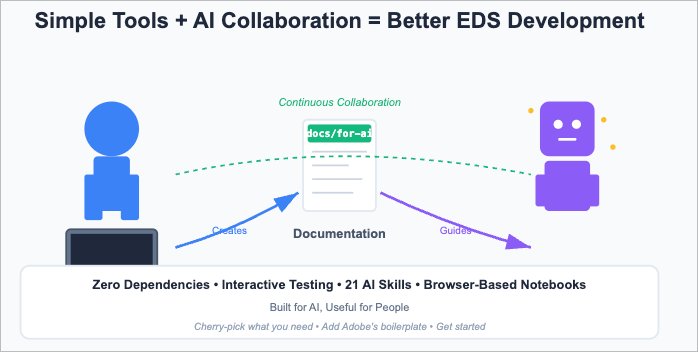
What This Framework Provides
The webcomponents-with-eds repository contains what you need for Adobe EDS development. The framework includes standard EDS blocks for reference and ipynb-viewer, a Jupyter notebook viewer that changes how you develop and test components.
Want to see my ipynb viewer in action: https://allabout.network/blocks/ipynb-viewer/test.html
The development server runs in pure Node.js. It serves your local files first, falls back to a proxy for missing resources, and includes live reload, which automatically refreshes your browser when files change. Start the server, edit your components, see results instantly.
The core framework has zero runtime dependencies. Development dependencies are optional and needed only for testing, linting, and building components that use external libraries.
Built for AI, Useful for People
Documentation makes or breaks any framework. This repository includes 32 files of development guidance organised by audience and purpose. These aren't generic tutorials - they're specific implementation guides with cross-references, real examples, and proven patterns.
The documentation was built with AI assistants in mind. Modern development increasingly involves AI collaboration, and AI needs structured, detailed, cross-referenced information to be helpful. But here's what matters - documentation clear enough for AI is also transparent enough for humans. Better, actually. The structure that helps AI navigate complexity also helps developers.
The docs/for-ai/ directory organises documentation by audience. New developers start with the EDS guide and raw blocks documentation. Experienced developers move to complex blocks and architecture standards. Architects and tech leads review design philosophy and system architecture. Each path provides the information needed for that role.
Cross-references create a web of knowledge. When you need information about testing, the documentation points you to relevant sections in architecture guides, implementation examples, and quality standards. This structure helps humans navigate the knowledge base - and works equally well for AI assistants.
The "for-ai" name acknowledges reality. We work alongside AI assistants now. Documentation optimised for AI assistance is simply well-structured technical documentation. No compromise, no separate versions. One knowledge base that serves both audiences.
The ipynb-viewer Block
The ipynb-viewer block enables Jupyter notebook viewing and execution directly in your EDS site. Code cells run in the browser with async/await support and ES6 imports. The block turns notebooks from static documentation into interactive development environments.
Helper functions make testing straightforward. Import testBlock() to decorate components in isolation. Use showPreview() to display results in an overlay with responsive device testing. The preview system shows how your component renders on mobile, tablet, and desktop viewports without leaving the notebook.
import { testBlock, showPreview } from '/scripts/ipynb-helpers.js';

const block = await testBlock('accordion', '<div>content</div>');

await showPreview(block.outerHTML, 'accordion');
This approach creates living documentation. Your component examples become interactive tutorials that execute real code and display actual results. Content creators can see components working. Developers can test variations. Sales teams can demonstrate capabilities. Everyone works from the same executable documentation.
The notebook format solves a problem in web development - documentation that goes stale. Traditional documentation describes how things worked when written. Notebooks execute current code, so they either work or fail visibly. No ambiguity, no wondering if the example still applies.
AI Integration
The framework integrates an AI assistant via Claude Code. Twenty-one skills from three sources provide capabilities. Adobe contributes six EDS-specific workflow skills from its Helix website repository. Anthropic provides eight general-purpose skills for document processing and development tools. Seven custom skills add EDS testing and documentation features.
Skills alone aren't enough. A skill that tells an AI assistant "create a block following best practices" provides process guidance but lacks implementation knowledge. The skill knows what to do but not how to do it. That's where the documentation framework becomes essential.
The documentation files contain the implementation knowledge that makes skills effective. When content-driven development orchestrates block creation, it relies on detailed documentation to understand the EDS architecture, design patterns, CSS approaches, and testing strategies. Skills provide workflow orchestration, and documentation provides implementation knowledge.
Twelve slash commands give quick access to everyday tasks—type/new-block to start the Content Driven Development process. Use /test-block to run testing. Call /jupyter-notebook to launch interactive testing environments. These commands combine skills and documentation to accomplish specific development tasks.
Ten autonomous agents handle complex multi-step operations. The code-architecture-reviewer analyses your codebase for consistency. The frontend-error-fixer debugs browser console errors and build failures. The documentation-architect creates structured documentation. These agents work independently on substantial tasks while you focus on other work.
Browser-Based Testing
Browser-based testing changes how you develop components. The jupyter-notebook-testing skill and ipynb-viewer block create an environment where you write tests as notebook cells, execute them in your browser, and see results immediately.
The testing system supports dual environments. Tests run in Node.js using jsdom for unit testing, then execute in actual browsers through the ipynb-viewer for integration testing. This catches both logic errors and browser-specific issues without switching tools or contexts.
The overlay preview system displays your components in different device contexts. Click a button to see how your component renders on mobile, tablet, or desktop. The preview overlays the current page so you can test in real browsers with real CSS, not simulations.
// Test in Node.js environment

const { JSDOM } = await import('jsdom');

const dom = new JSDOM('<!DOCTYPE html><html><body></body></html>');

global.window = dom.window;

global.document = dom.window.document;

// Test the same code in the browser

const block = await testBlock('accordion', markup);

await showPreview(block.outerHTML, 'accordion');
This dual-environment approach catches issues that single-environment testing misses. Your component works in Node.js but fails in Safari? The browser tests reveal that. Your CSS looks correct locally, but breaks in the deployed environment? The preview system shows the problem before deployment.
The notebook format makes test results shareable. Send someone a link to your notebook, and they see what you see - the test code, the execution results, the visual output. No environment setup, no "works on my machine" problems. The notebook runs in their browser with your site's actual CSS and JavaScript.
Development Without Build Steps
Simple components need no build process. Create a directory in /blocks/, add your JavaScript file, write your CSS, and start developing. The server serves files directly. Changes appear immediately. This direct-editing workflow applies to most EDS components.
Complex components with external dependencies are placed in the /build/ directory. Install npm packages, develop with modern tooling, then run the build script. The bundler creates self-contained files and copies them to /blocks/. Your deployed component has zero external dependencies despite using sophisticated libraries during development.
// Develop in /build/shoelace-card/ with dependencies

import { SlCard, SlButton } from '@shoelace-style/shoelace';

export default function decorate(block) {

  // Modern JavaScript with external dependencies

  // Bundled into self-contained blocks/ output

}
This dual approach gives you flexibility. Use direct editing for straightforward components. Switch to the build workflow when you need external libraries or advanced features. Both patterns produce identical standard EDS blocks in production.
Custom Utilities
The repository includes custom utility scripts that address specific development needs. The test-framework.js file provides a zero-dependency testing system with simple test registration and reporting. The ipynb-helpers.js file enables Jupyter Notebook testing by providing helper functions for block decoration and preview. The instrumentation.js file tracks performance metrics, function calls, and execution timing.
These utilities solve problems encountered during actual development. They're practical solutions that emerged from building components and hitting obstacles. The build-component.js script automates the bundling workflow because manually copying files became tedious. The instrumented versions of EDS files exist because understanding performance requires detailed execution tracking.
The framework also includes reference copies of Adobe's core EDS files - aem.js, scripts.js, and delayed.js. These aren't meant for production use. Get the latest versions from aem.live for actual projects. The reference copies demonstrate how these files work and serve as starting points for instrumented versions.
Skills Plus Documentation
Adobe's innovation with Claude Skills for EDS development provided workflow orchestration. Anthropic's Claude Code framework enabled context-aware skill activation. This repository adds the implementation knowledge layer that makes those orchestrations effective.
Your EDS block fails, resulting in cryptic errors. You need help, but documentation is scattered across GitHub issues, Stack Overflow threads, and half-remembered conference talks. An AI assistant with skills but no implementation knowledge can tell you to "check the block decoration" or "validate your content model", but can't show you specifically what's wrong or how to fix it.
The documentation framework provides that implementation knowledge. Detailed guides explain block architecture, decoration patterns, common mistakes, and solutions. Cross-references connect related concepts. Examples show working code. An AI assistant with both skills and documentation can analyse your specific situation, identify the actual problem, and suggest concrete fixes.
This combination - workflow orchestration through skills, implementation knowledge through documentation, practical tools through utilities - creates an environment where AI assistants become helpful development partners rather than confused observers.
What This Costs
The framework is free. MIT licensed, open source, available on GitHub. Clone it, modify it, use it in commercial projects: no fees, no subscriptions, no licensing restrictions.
Runtime costs are zero. No external dependencies means no npm packages to install, no CDN fees, no third-party services. Your components bundle everything they need into self-contained JavaScript and CSS files. Deploy them anywhere that serves static files.
Development costs reduce over time. The upfront investment is learning the patterns and understanding the documentation structure. After that, development accelerates. Components that take days with complex build systems take hours with direct editing. The AI integration further reduces time through automated workflows and instant access to implementation knowledge.
Infrastructure costs are minimal. The development server runs on any machine with Node.js installed: no Docker containers, no Kubernetes clusters, no cloud services required for development. For production, you're running Adobe EDS - the framework adds nothing to your infrastructure needs.
The hidden costs you avoid matter more. No npm audit warnings about vulnerable dependencies. No breaking changes when packages update. No time spent debugging build tool configurations. No security patches for external libraries. No license compatibility issues. The maintenance burden stays low because the code stays simple.
What Makes This Approach Different
Most frameworks assume complexity is necessary. They require build tools, transpilation, module bundlers, and layers of abstraction. This framework demonstrates the opposite. Start with simple tools and precise documentation. Add complexity only when needed.
The zero-dependency philosophy isn't about avoiding useful libraries. It's about understanding what you actually need. Components can use external libraries during development, then bundle those dependencies into self-contained outputs. You get sophisticated UI elements without runtime dependencies or security vulnerabilities from outdated packages.
The documentation-first approach recognises that code without context is just syntax. Every component includes detailed documentation that explains not just how it works but also why it works that way. The architectural decisions, the trade-offs, the alternatives considered - all captured in files that developers can understand.
The ipynb-viewer block exemplifies this philosophy. Instead of building a complex testing framework with runners, reporters, and configuration files, the solution uses standard Jupyter notebooks executed in browsers. The format already exists, tools already support it, and people already understand it. The innovation is recognising that notebooks solve the testing documentation problem without creating new complexity.
The AI integration acknowledges that development is changing. AI assistants aren't replacing developers; they're amplifying capabilities. But they need the correct information to be practical. Skills provide workflows, documentation includes knowledge, and utilities offer tools. Together, they create an environment where AI assistance helps rather than generating plausible-sounding but incorrect suggestions.
How to Use This Repository
This repository is deliberately designed as a reference and learning project - not a production starter kit. The right approach for your next EDS project:
Cherry-pick what you need. Browse the documentation, examine the patterns, review the utilities. Take the ipynb-viewer block if you want interactive testing. Adopt the testing approach if dual-environment testing appeals to you. Copy the documentation structure if you need AI-friendly guides. Use the custom utilities if they solve your problems.
Start with Adobe's boilerplate. Always begin production projects with the latest official boilerplate from aem.live. Adobe maintains these files - aem.js, scripts.js, delayed.js - with the latest platform features and fixes. The versions in this repository are reference copies for learning and instrumentation, not production use.
Combine both approaches. Use Adobe's foundation, and add the innovations from this repository that suit your needs. The ipynb-viewer block works with any EDS project. The documentation patterns apply regardless of your starter template. The testing utilities integrate with standard EDS setups, and the AI skills and documentation support EDS development.
The value here isn't in using this repository wholesale. It's in understanding the patterns, adopting the approaches that work for you, and building better EDS projects with proven techniques combined with Adobe's official foundation.
Getting Started
For exploring this repository:
git clone https://github.com/ddttom/webcomponents-with-eds.git

cd webcomponents-with-eds

node server.js
The server runs immediately with zero dependencies. This gets you started exploring the patterns and documentation.
For full functionality - testing, linting, building complex components, and Jupyter notebook support - install the development dependencies:
npm install
This installs jsdom for Node.js testing, ESLint and markdownlint for code quality, and other development tools. None of these are runtime dependencies. Your deployed components remain zero-dependency.
For Claude Code integration, install the hook dependencies:
cd .claude/hooks

npm install

cd ../..
This enables the slash commands, skills, and agents. Skip this step if you're not using Claude Code - the framework works fine without it.
For your actual project, start with Adobe's official boilerplate from aem.live, then cherry-pick the patterns and utilities from this repository that suit your needs.
The repository includes standard EDS blocks for reference: accordion, cards, columns, and others. These demonstrate basic patterns and provide starting points. The value comes from the development environment and documentation system.
Experiment with the ipynb-viewer block. Create a notebook with component tests. Execute cells to see results. Use the overlay preview to check responsive behaviour. The notebook becomes your development playground where ideas turn into working code quickly.
Use the documentation system as a learning resource. Start with the audience-appropriate path - new developers, experienced developers, or architects. Follow the cross-references to explore related topics. The index file provides navigation between all documents.
Experiment with AI integration if you use Claude Code. The slash commands provide access to common workflows. The skills activate automatically based on context. The agents handle complex tasks autonomously. See how AI assistance works when it has both orchestration and implementation knowledge.
What's Inside the Repository
The repository represents substantial development effort across multiple languages and file types. The codebase contains hundreds of files organised into a working system.
Documentation: Markdown files form the knowledge base. This documentation serves both human developers and AI assistants, providing the implementation knowledge that makes the framework effective. The docs cover everything from basic EDS concepts to architecture patterns, testing strategies, and security guidelines.
Python Skills: Python files power document processing capabilities, including docx, pptx, xlsx, and PDF manipulation. These provide enterprise-grade document capabilities without external services. The skills integrate with Claude Code to enable sophisticated document workflows.
JavaScript: JavaScript files include the custom utilities, test frameworks, Jupyter helpers, instrumentation tools, and component implementations. These form the core development environment - the server, the testing system, the build tools, and the working components.
Supporting Files: CSS provides styling; JSON files configure tools and store data; Jupyter notebooks enable interactive testing; and HTML files provide documentation interfaces.
The scale demonstrates commitment. This isn't a weekend project or a proof of concept. It's a working system, refined through actual use, thoroughly documented, and designed for long-term maintenance. You get access to all of it for free under an MIT licence.
The Practical Reality
This framework represents thousands of hours of development, testing, and refinement - the COCOMO model estimates it would cost over £3.5 million to build from scratch with a team of 16 developers working for two years. It's not a theoretical exercise - it's a working system used for actual EDS projects. The components are production-ready. The documentation reflects real challenges and solutions. The utilities solve problems encountered in practice.
You don't need to adopt everything. Take the patterns that suit your needs. Use the documentation as a reference. Adapt the utilities for your context. The framework is deliberately designed as a "cherry-picker repository" - a collection of working examples and proven approaches you can incorporate into your own projects.
The key insight remains simple. Sophisticated web development doesn't require complex toolchains. Clean thinking, good documentation, and proper AI integration achieve enterprise-level capabilities with zero external dependencies. This framework proves it.
Find the repository here: https://github.com/ddttom/webcomponents-with-eds
Related Articles